

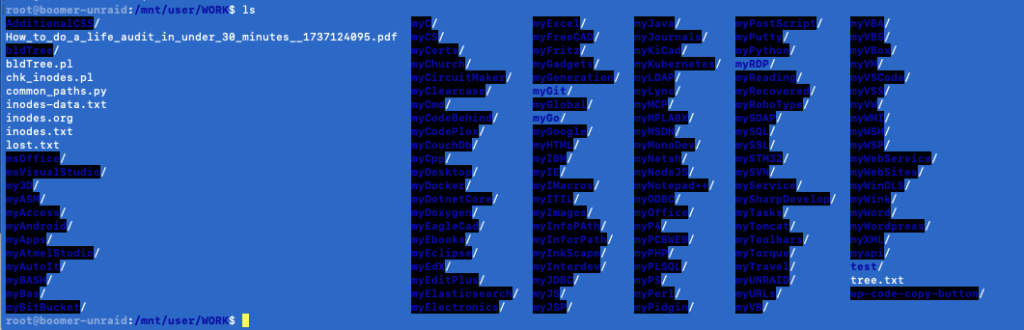
By default, UNRAID’s terminal colors (while using ls) are not desirable to my eyes.
As seen below, all folders with +w on other, show with bold, blue, & black (very hard to read)
The dircolors tool is used to create and export the color setting to LC_COLOR environment variable.
# Attribute codes:Obtained from /etc/DIR_COLORS
# 00=none 01=bold 04=underscore 05=blink 07=reverse 08=concealed
# Text color codes:
# 30=black 31=red 32=green 33=yellow 34=blue 35=magenta 36=cyan 37=white
# Background color codes:
# 40=black 41=red 42=green 43=yellow 44=blue 45=magenta 46=cyan 47=white
Comparing changes made: diff /etc/DIR_COLORS ~/.dircolors
75c75
< DIR 01;34 # directory
—
> DIR 01;36 # directory (WAS 01;34)
88c88
< STICKY_OTHER_WRITABLE 30;36 # dir that is sticky and other-writable (+t,o+w)
—
> STICKY_OTHER_WRITABLE 30;42 # dir that is sticky and other-writable (+t,o+w)
91c91
< OTHER_WRITABLE 01;34;40 # dir that is other-writable (o+w) and not sticky
—
>OTHER_WRITABLE 00;33 # dir that is other-writable (o+w) and not sticky (WAS:01;34;40)
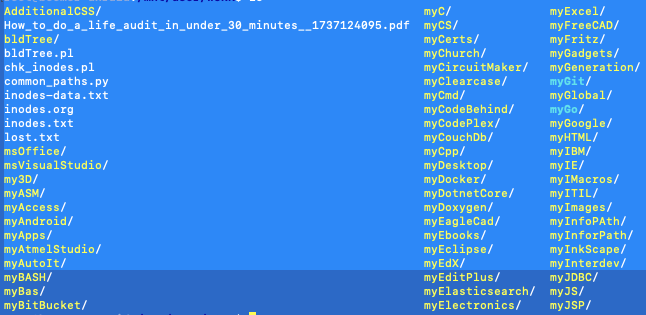
With the above changes, folders are much easier to read.
In summary:
I changed DIR from 01;34 (BOLD;BLUE) to 01;36 (BOLD;CYAN)
I changed OTHER_WRITABLE from: 01;34;40 (BOLD;BLUE;BLACK) to 00;33 (NONE;YELLOW)
| COLOR ATTRIBUTE | OLD CODE | OLD COLOR | NEW CODE | NEW COLOR |
|---|---|---|---|---|
| DIR | 01;34 | BOLD;BLUE | 01;36 | BOLD;CYAN |
| OTHER_WRITABLE | 01;34;40 | BOLD;BLUE;BLACK | 00;33 | NONE;YELLOW |
To replicate:
cp /etc/DIR_COLORS /root/.dircolors
echo 'test -r ~/.dircolors && eval "$(dircolors -b ~/.dircolors)"' >> ~/.bash_profile
source ~/.bash_profile
To make it persistent:
# Setup the persistent go file
touch /boot/config/go-dircolors.cfg
echo '#--- go-dircolors.cfg ---' >> /boot/config/go-dircolors.cfg
echo 'test -r ~/.dircolors && eval "$(dircolors -b ~/.dircolors)"' >> /boot/config/go-dircolors.cfg
echo '#--- go-dircolors.cfg ---' >> /boot/config/go-dircolors.cfg

# Copy default DIR_COLORS to Flash Drive Config Folder, making it persistent
cp /etc/DIR_COLORS /boot/config/go-dircolors.src
# *** Make desired color changes to go-dircolors.src ***

# Manually add to /boot/config/go (before emhttp &)
echo 'cp /boot/config/go-dircolors.src /root/.dircolors' >> /boot/config/go
echo 'cat /boot/config/go-dircolors.cfg >> /root/.bash_profile' >> /boot/config/go